
How to Tag Your AIP and ERSA for CASA RPL and PPL Exams
Moving from your flight training to the theory exams can feel like a huge step. Many student pilots preparing for their RPL or PPL feel overwhelmed by the piles of rules and papers. Learning to find what you need quickly is a skill that helps you succeed on exam day. CASA has some very specific rules about what you can take into the room with you. Your Aeronautical Information Publication and the En Route Supplement Australia are your best friends for finding rules and flight data.
Since these binders are so thick, you are allowed to use page tags to find the sections you use most often. Just keep in mind that the regulators have strict rules for these tags. You can only use fifteen tags for your AIP and five tags for your ERSA. This means you need to make sure each tag is useful.
At PPL PREP, we want to help you use an active study method. This guide shows how highlighting and tagging your documents helps you revise. We will go over the exam rules and a simple preparation workflow. We also have a list of the best spots to put your twenty tags.
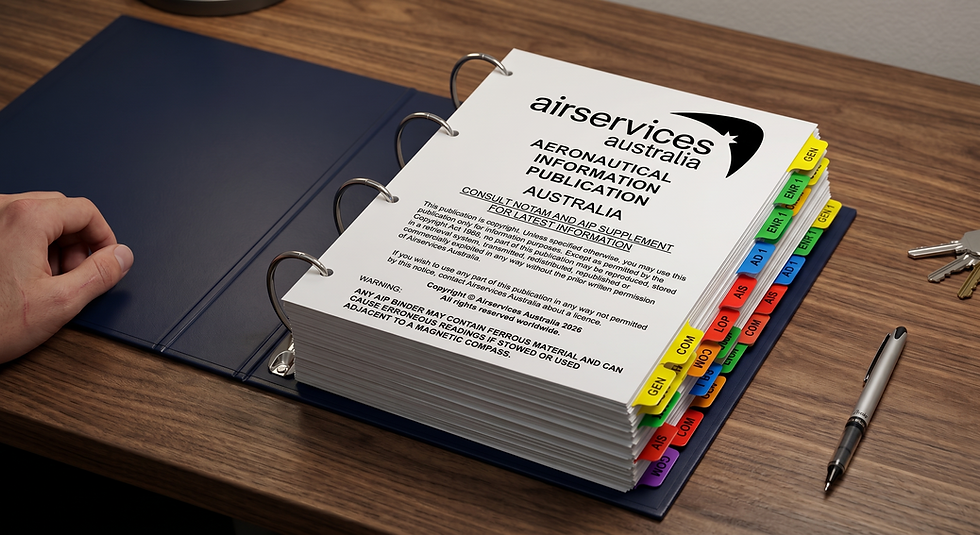
Table of Contents
Understanding Permitted Material Regulations
Before you start marking your books, you should check the rules for exam materials. The staff at the testing centers check your documents to keep things fair. If you don't follow the rules, they might take your books away.
You are allowed to underline and highlight in your approved documents as long as you don't add any of your own notes. Do not write any cross-references in the margins of the pages. Your highlighting should only help you see the printed text better.
The rules for page tags are also quite strict. Your tags can only have the topic headings of the section they mark. These headings have to be written in English. You cannot use tags that have study tips or extra materials pasted on them. If a tag has notes on it, you will have to remove it before you can start your exam.
Your documents need to be held together properly. While you can print some publications yourself, you must bind them together securely. Do not bring any loose sheets of paper. Most students use ring binders to keep everything in place. You can use plain section dividers to help you navigate as long as they only have a volume description. These dividers don't count as part of your tag limit.
It is a good idea to check the official materials list before you head to your exam. You want to be sure your documents are up to date for the current cycle.
Summary of Examination Material Allowances
Publication | Tag Allowance | Highlighting Permitted | Notes Permitted |
Aeronautical Information Publication | Maximum 15 tags | Yes | No |
En Route Supplement Australia | Maximum 5 tags | Yes | No |
Visual Flight Rules Guide | No tags permitted | Yes | No |
Civil Aviation Safety Regulations | No tags permitted | Yes | No |
Civil Aviation Orders | No tags permitted | Yes | No |
All Aeronautical Charts | No tags permitted | Yes | No |
The Active Study Method
Getting your reference materials ready is actually a great way to study. We call this the active study method. When you learn a concept in our PPL PREP school and then find the rule in your binder, you learn it better.
The act of turning pages and using a highlighter builds strong memory. When you are busy during an exam, you might remember where a rule is based on its spot on the page. If you treat document prep as a revision exercise, every highlight has a purpose.
Try not to highlight too much of the text. When a whole page is covered in color, it becomes harder to find the data you need. We suggest highlighting only the core numbers and vital exceptions to rules. Highlighting just the specific visibility requirement like "5000M" helps your eyes find the answer faster.
Document Preparation Workflow
To get the most out of your study time, you should use a simple workflow. You should prepare your AIP and ERSA while you are doing your theoretical study. Doing this the night before your exam is not the best way to learn.

Here is a four-step workflow we recommend:
Understanding the Theory: Study a topic like fuel requirements in your PPL PREP course. Make sure you understand the concept before you open your books.
Finding the Source: Open your manual and find the exact text for the rule you just learned. This helps you get used to how the document is structured.
Using Highlights: Use a light color to mark numerical values or vital conditions. If you need to emphasize something later, you can use a darker color.
Adding a Tag: Decide if the section is used often enough for a tag. If it is a high-frequency topic, put a tag on the page. Label it clearly with the section title.
The Definitive 15 Aeronautical Information Publication Tags
The AIP has the rules for the air and flight procedures. Since you only get fifteen tags, you have to be very careful with your choices. We have a list of fifteen spots that are great for your RPL and PPL studies.
Tag 1: Definitions and Abbreviations (GEN 2.2)
Your first tag should go at GEN 2.2 for Definitions and Abbreviations. Aviation terms are very specific. Exam questions often test how well you know these definitions. This section has legal definitions for terms like 'Night' and 'Lowest Safe Altitude'.
The abbreviations list is helpful for reading weather forecasts. The exam will give you weather data with acronyms. Highlighting common ones like 'BR' for mist will save you time. You will use this section a lot while you study meteorology.
Tag 2: First and Last Light Computations (GEN 2.7)
The rules for calculating daylight at GEN 2.7 are very important for your exams. VFR rules say you can't fly at night without a special rating. Also, you have to arrive at your destination ten minutes before the end of daylight.
You need to know how to convert UTC to Local Mean Time using the tables here. Highlighting the conversion rules helps you avoid math mistakes. We recommend tagging the page with the table to help you with your navigation calculations.
Tag 3: Meteorological Services (GEN 3.5)
Weather reports are often full of codes. Tagging GEN 3.5 gives you quick access to the keys for Aerodrome Forecasts and other weather advisories. Exams will give you raw weather data to interpret for your flight planning.
Highlighting cloud descriptors like 'SCT' for scattered helps you understand visual flight rules. You should also highlight words like 'INTER' and 'TEMPO' to help you read the data. Knowing the duration of these periods is vital for your fuel planning.
Tag 4: Air Traffic Control Clearances (ENR 1.1)
In the ENR volume, ENR 1.1 has the general rules for your flight. A tag for ATC Clearances is very helpful. This section tells you what a pilot must do when flying in controlled airspace.
It explains how to get a clearance and the protocols for read-backs. Highlighting when you can deviate from a clearance during an emergency helps with law questions. You can also find the rules for what to do if you can't follow an instruction.
Tag 5: Land and Hold Short Operations (ENR 1.1)
The rules for Land and Hold Short Operations in ENR 1.1 are common in exams. Tagging this spot helps you find the weather minima for these operations.
The crosswind limits are specific metrics that can be hard to memorize. Highlighting when you can accept a LAHSO clearance makes these rules easier to find. You should also highlight the read-back rules for hold-short instructions because communication is very important.

Tag 6: Operations in Class G Airspace (ENR 1.1)
Since much of your early training is in Class G airspace, these rules in ENR 1.1 are a big focus. A tag here helps you find the rules for non-controlled aerodromes.
This section covers circuit directions and radio broadcasts on the CTAF. Highlighting the distances for circuit entry will help with scenario questions. Marking the rules for joining the circuit side or overflying the field gives you quick answers.
Tag 7: SARWATCH and Transponder Requirements (ENR 1.1)
Aviation safety depends on search and rescue and electronic surveillance. Tagging the sub-section in ENR 1.1 for SARWATCH and transponders is a smart choice. You need to know when a SARTIME must be cancelled to avoid a rescue response.
This section also has the transponder codes for different situations. Highlighting these four-digit codes helps you find them quickly under pressure.
Emergency Situation | Mandatory Transponder Code |
Unlawful Interference (Hijack) | 7500 |
Radio Communication Failure | 7600 |
General Emergency | 7700 |
Tag 8: Alternate Aerodromes (ENR 1.1)
Planning for an alternate aerodrome is a concept that is tested a lot in flight planning. Tagging ENR 1.1 for Alternate Aerodromes is essential. This section shows the weather minima that require an alternate.
For VFR flights, this is usually needed if the cloud base is below 1500 feet. This section also has the rules for aerodrome lighting near the end of daylight. Highlighting the rules for portable or pilot-activated lighting helps you avoid memorizing dense text.
Tag 9: Fuel Requirements (ENR 1.1)
The section for Fuel Requirements in ENR 1.1 is right after the alternate rules. This tag is vital for your loading calculations. The rules tell you how much reserve fuel you need for your aircraft.
It also has the rules for holding fuel when the forecast shows intermittent weather. If a forecast has an 'INTER' period, you need thirty minutes of holding fuel. A 'TEMPO' period requires sixty minutes of fuel. Highlighting these times and the thirty-minute buffer rule is a great idea.
Tag 10: Visual Flight Rules Minima (ENR 1.2)
You should have a tag for ENR 1.2 Visual Flight Rules. This section has the table for VMC requirements in different airspaces. Exam questions often ask you to identify visibility and distance from cloud based on a scenario.
Highlighting the differences for operations below 3000 feet MSL provides clarity during your assessment. You will be able to see the visibility and distance requirements for each altitude.
Tag 11: ATS Airspace Classification (ENR 1.4)
Understanding the structure of the sky is part of being a safe pilot. Tagging ENR 1.4 for Airspace Classification gives you quick access to the rules for various classes. This section shows which flights are allowed in each class.
It also explains the services provided by ATC and radio requirements. There is a table that breaks these services down clearly. Highlighting speed limits in lower-level airspaces helps you answer procedural questions.
Tag 12: Flight Planning and Notification (ENR 1.10)
ENR 1.10 has the rules for submitting flight plans. A tag here helps with administrative questions. You need to know the timeframes for submitting a notification before you leave.
You must understand what goes into a flight plan and the rules for changing it while in the air. Highlighting the difference between flights that need formal notification and those that just need a manifest is helpful for your prep.
Tag 13: Accidents and Incidents Reporting (ENR 1.14)
Aviation safety relies on a culture of reporting. ENR 1.14 has the rules for Accidents and Incidents. A tag here helps you tell the difference between reportable matters.
The exam might list a scenario like a bird strike and ask you to classify it. You will need to find the timeframe for reporting to the safety bureau. Highlighting the lists of incidents under each category saves you time during the exam.
Tag 14: Prohibited, Restricted, and Danger Areas (ENR 5.1)
Knowing how to navigate special airspaces is a core skill. Tagging ENR 5.1 for Prohibited and Restricted Areas helps you find the rules for these zones quickly.
You need to know that Prohibited areas are not to be entered. Restricted areas need a clearance before you can go in. Danger areas have a hazard but don't legally stop you. Highlighting the rules for activation and transit will help you get points on your exam.
Tag 15: Aerial Sporting and Recreational Activities (ENR 5.5)
The last AIP tag should go at ENR 5.5 for Sporting and Recreational Activities. This section has data for gliding and parachuting.
Questions often test your knowledge of ground signals for gliding. You might also be tested on the boundaries for parachuting zones. Highlighting the altitudes for these activities helps you answer scenario questions.
The Essential 5 En Route Supplement Australia Tags
While the AIP has the general rules, the ERSA has location-based data and conversions. You get five tags for this document. Use these tags for complex tables and decoding guides that are hard to memorize.
Tag 1: Introduction and Aerodrome Information (INTRO)
Put your first tag at the INTRO section. This part helps you understand the rest of the supplement. It has decodes for aerodrome lighting and approach slope indicators.
The INTRO section also explains the Runway Distances Legend. Highlighting the sequences for radio-controlled lighting helps you answer questions about night operations.
Tag 2: General Flight Planning Requirements (GEN-FPR)
The GEN-FPR section for Flight Planning Requirements is complex and deserves a tag. This section has tracking requirements for specific locations. Some regional aerodromes have visual flight routes for noise abatement.
Questions might ask you for a track or altitude based on a location scenario. Tagging this section helps you find the rules without looking through every page in the directory.
Tag 3: Special Procedures (GEN-SP)
The GEN-SP section for Special Procedures has rules for unique areas. Tagging this spot gives you access to Fly Neighbourly Advices and restricted areas.
You need to know the altitudes for flying over national parks or marine reserves. Highlighting the altitudes for prominent spots helps you make accurate calculations during your exam.
Tag 4: In-Flight Information Services (GEN-FIS)
The fourth tag should mark the GEN-FIS section for In-Flight Information Services. This area shows how to get weather updates while you are flying. It includes rules for using the beep-back system and cancelling SARTIMEs.
This section also has rules for remote areas which are common in exams. Highlighting the communication rules for these areas is a good idea since they dictate your survival equipment.
Tag 5: Conversion Tables (GEN-CON)
Your final tag goes to the GEN-CON section for conversions. This is like a mathematical lifeline for you. It has the weight conversions for aviation fuels. This table shows how much AVGAS and AVTUR weigh.
This section also has the crosswind component graph. You will need this for your performance charts. For example, you can use the chart to find the crosswind for a twenty-knot wind. Highlighting the fuel weights and tagging the graph will help you with the math portions of your exam.
Incorporating the Visual Flight Rules Guide
The Visual Flight Rules Guide is an amazing resource for student pilots. It explains the rules in plain English. However, CASA has a specific rule for this book. You can bring it to the exam but you cannot put any page tags in it.
You can use highlighters for important spots in the guide but the edges have to stay clear of tags. We recommend using this guide while you study at home. When you find something helpful, you can find the legal reference in your AIP and tag that instead. This helps you understand the concept while keeping your access to the formal rules.
CASA PPL Exam Tips and Strategies
Passing your exam takes more than just knowing your tags. You also need a strategy for managing your time. You have three hours and thirty minutes for the test. With sixty questions to answer, you should keep moving at a steady pace.
CASA lets you bring specific navigation gear like a compass or a ruler. We recommend practicing with your manual flight computer before your exam. If the circular slide rule is hard for you, make sure you can do the calculations on your basic calculator.
You must follow the rules for the calculator you bring. It has to be a basic model with only primary functions. Scientific calculators or ones with aviation conversions are not allowed.
Frequently Asked Questions
Can you highlight text within the Visual Flight Rules Guide?
Yes, you can highlight text in the VFRG. You just can't put any physical tags on the edges of the pages. Make sure your highlighting doesn't have any of your own notes or formulas.
What happens if an invigilator finds writing on a page tag?
If a tag has anything other than a standard English heading, it counts as an unauthorized notation. You will have to remove the tag before you can take your exam.
Are manufactured section dividers counted towards the fifteen-tag limit?
No, they are not part of the limit. Blank dividers or index tabs don't count as part of your page tag limit. You can use these to help you navigate the thick volumes of your manuals.
Can a student print their own copy of the En Route Supplement Australia?
No, you can't. While you can print some documents yourself, CASA does not approve of self-printed copies of the ERSA or the AIP. You must use the official versions of these manuals.
Is the fuel weight conversion table located in the Aeronautical Information Publication?
No, it is not there. The fuel weight conversions and crosswind charts are in the ERSA in the GEN-CON section. This is why GEN-CON is such a great spot to mark with a tag.
Examination Success Strategy
Getting your documents ready with highlighting and tagging is a proven way to learn. This active study method helps you map your syllabus to the legal texts you will use in your career.
We recommend starting this workflow early in your PPL PREP training. By the time you sit your exam, navigating your manuals will feel like second nature. Good preparation reduces your search time and lets you focus on your calculations. Dive into our online ground school and approach your exams with confidence.


Comments